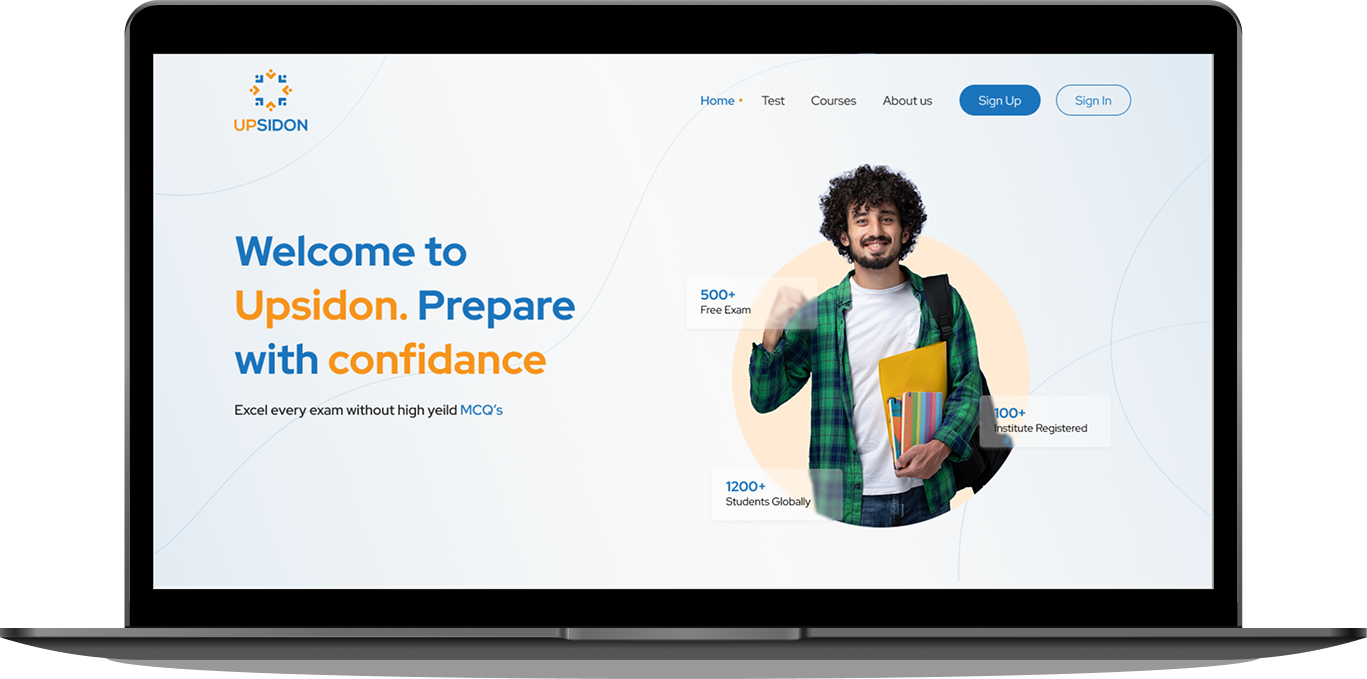
Upsidon is a web platform for students preparing for JEE and NEET exams, where institutes buy subscriptions and manage their batches. Teachers, assigned by institutes, create and schedule exams for students using a question bank provided by the admin. Students can access scheduled exams, track their progress, and practice with custom tests. The system makes it easy for institutes to organize batches, assign teachers and students, and for teachers to analyze student performance, while admins maintain the exam question pool.
User Research, Interaction Design, Visual Desig Prototyping, Figma and Jira
July 2021 - December 2021
Students preparing for JEE/NEET face inconsistent access to quality mock exams, performance tracking, and effective teacher guidance. Institutes and teachers need feature-rich, easy-to-manage platforms to administer exams, monitor student progress, and align teaching methods. Existing platforms lack seamless workflows for multi-role management, real-time analytics, and flexible exam creation. Upsidon aims to bridge these gaps by delivering a unified solution for students, teachers, and institutes, enabling structured preparation, transparent analytics, and streamlined administration.
Initiated the project with a detailed session alongside stakeholders and their team to define scope, align goals, and clarify expectations.
Studied the provided scope documentation to extract and prioritize detailed requirements for each user group.
Benchmarked similar EdTech solutions to identify user patterns, essential features, and design pitfalls.
Subject-Wise Scheduled Exam List - Dashboard displays all upcoming exams created by teachers, organized by subject for quick access.
Custom Practice Exams – Students can design their own exams using manual question selection or AI-generated recommendations.
Difficulty Level Controls – Option to define the level (Easy, Medium, Hard) when creating practice exams.
Progress Tracking Dashboard – Clear performance analytics summarizing attempted exams, scores, and improvement trends.
Cross-Institute Exam Access – Ability to participate in exams scheduled for all students beyond their enrolled institute.
Minimal & Intuitive Exam Interface – Real-time status indicators for solved, unsolved, and skipped questions using distinct color codes.
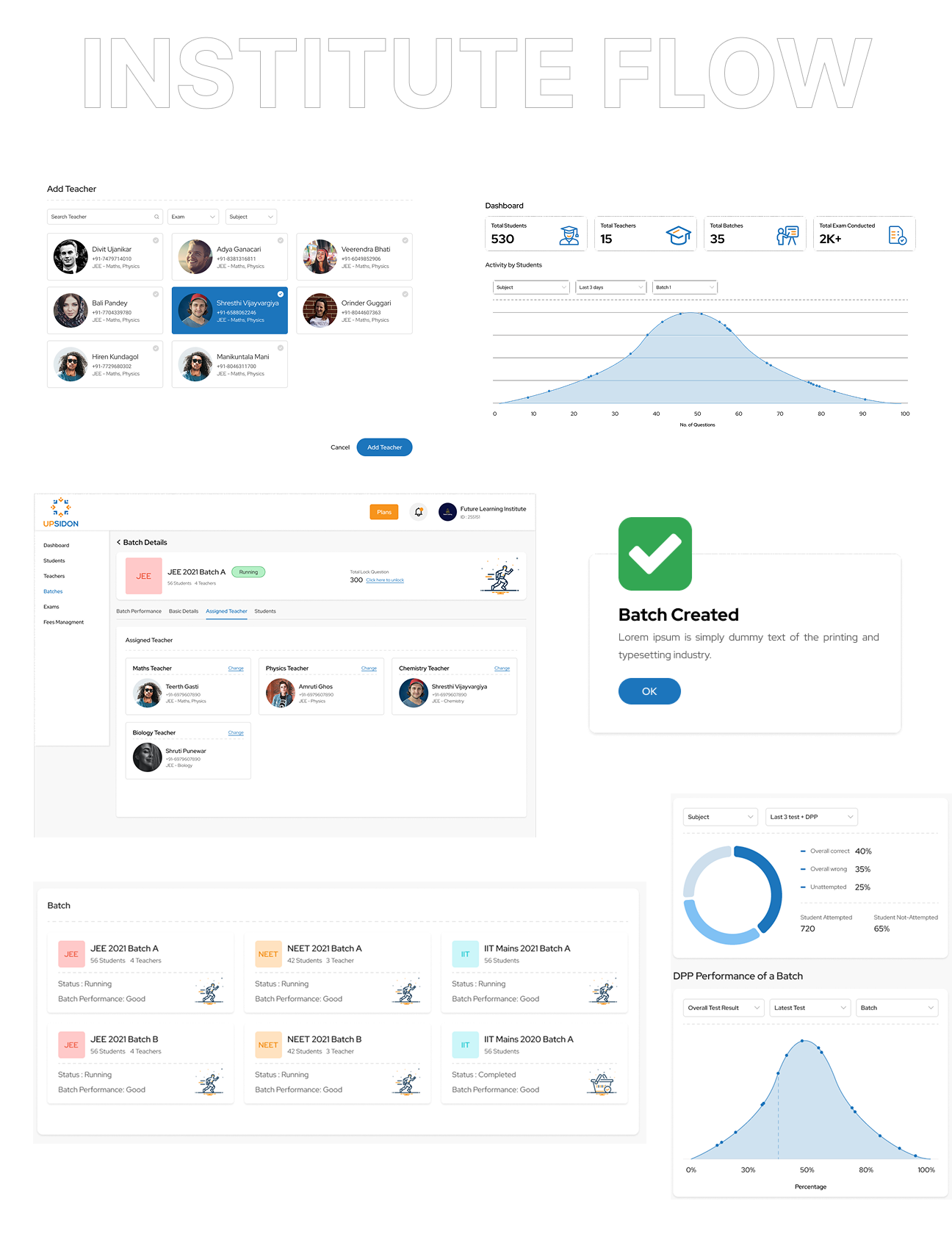
Easy Batch Management – Create, edit, and manage multiple student batches in a few clicks.
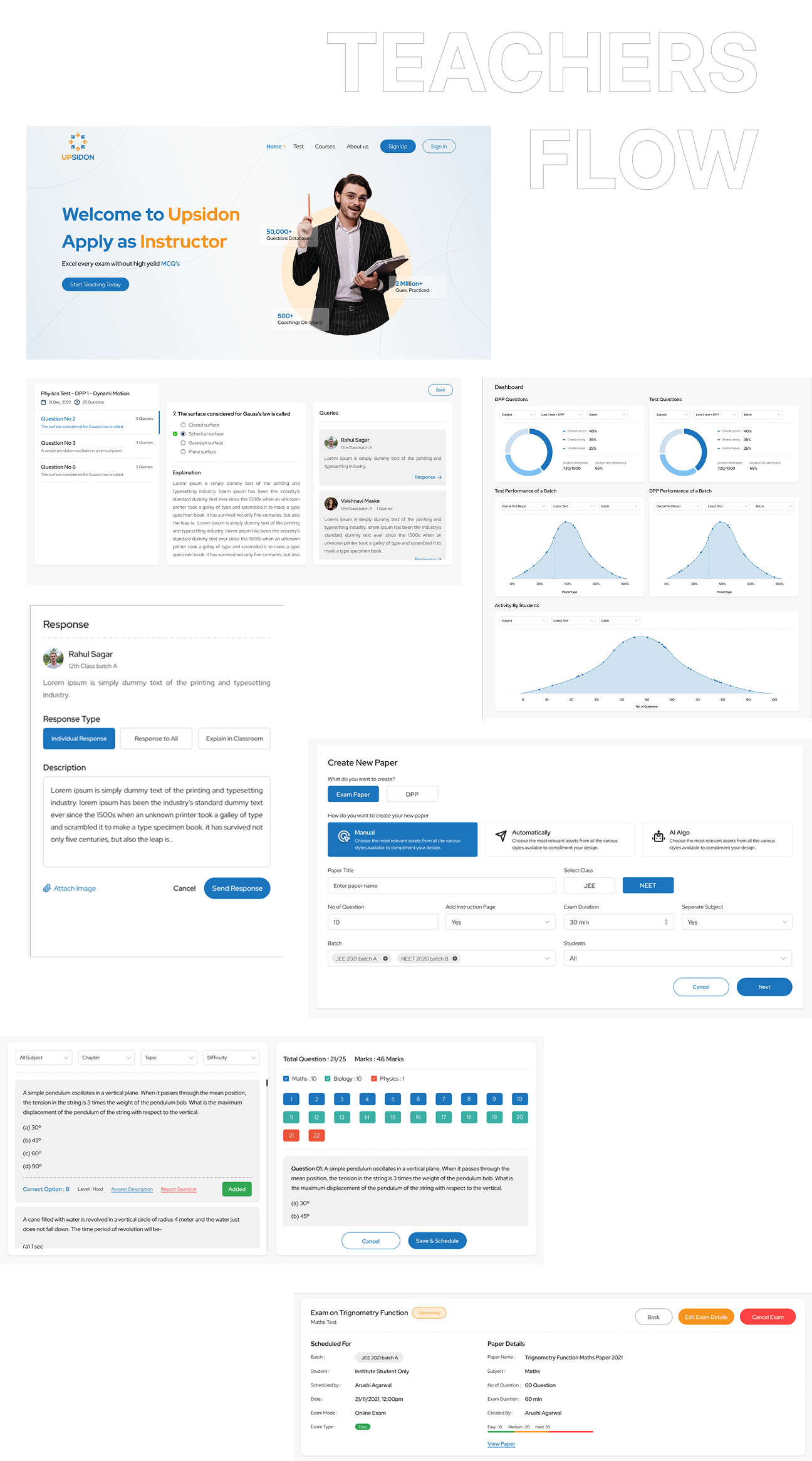
Flexible Exam Creation – Build tests manually or with AI assistance, with adjustable difficulty levels.
Granular Student Tracking – Monitor performance batch-wise, subject-wise, and down to individual students.
Quick Exam Insights – At-a-glance reports with average scores, accuracy rates, and topic-wise strengths/weaknesses.
Identifying Weak Students – Automatic highlighting of underperforming students based on performance metrics.
Student Query Resolution – During exams, students can leave remarks on questions, which teachers can address later.
Streamlined Batch Creation – Simple process to set up new batches in seconds.
Role & Responsibility Assignment – Easy UI to assign students to teachers and link batches to specific faculty.
Institute-Wide Progress Analytics – Monitor the performance of individual students over time across subjects.
Teacher Performance Evaluation – Measure teaching effectiveness using aggregated student results and growth rates.
Easy Role Management – Centralized admin panel to create, edit, and control roles for teachers, managers, and other staff.
Multi-Profile Management – Seamless switching between profiles for users managing multiple institutes, without repeated logins.
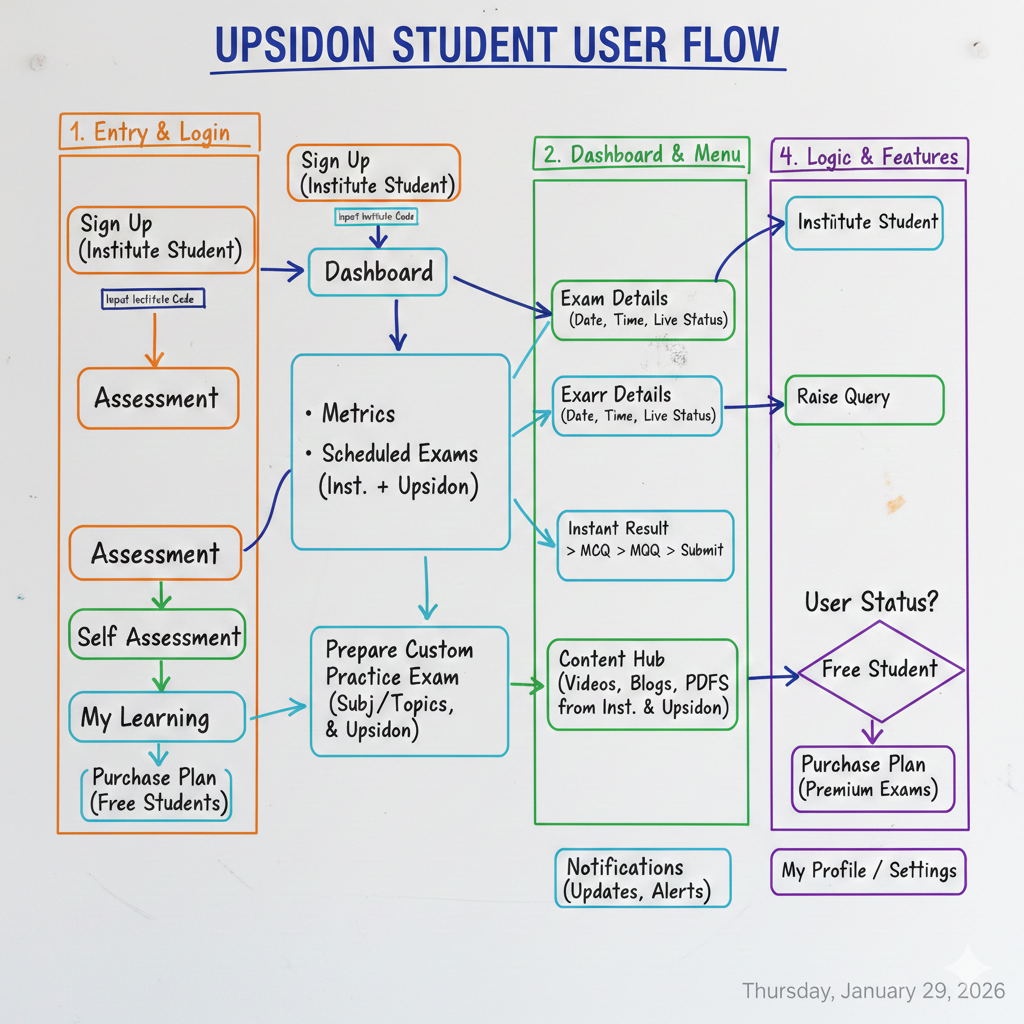
After listing out prioritized solutions for each user group Students, Teachers, Institutes. I have created detailed user flow maps that visualize every key journey. This covered core actions and pain points for each role.
In response to tight deadlines and specific stakeholder requests, I transitioned directly from finalized user flow maps to creating high-fidelity mockups. These polished, fully branded, and interactive prototypes were crafted using Figma, capturing the complete visual design and user experience of the final product. This approach enabled stakeholders to engage with realistic representations early on, accelerating feedback cycles and ensuring rapid alignment with client expectations. By focusing on high-fidelity designs from the outset, I was able to facilitate focused, actionable reviews and streamline decision-making without compromising on design quality or detail. This strategy underscored adaptability and efficiency, delivering compelling, detailed prototypes that drove the project forward under time constraints.
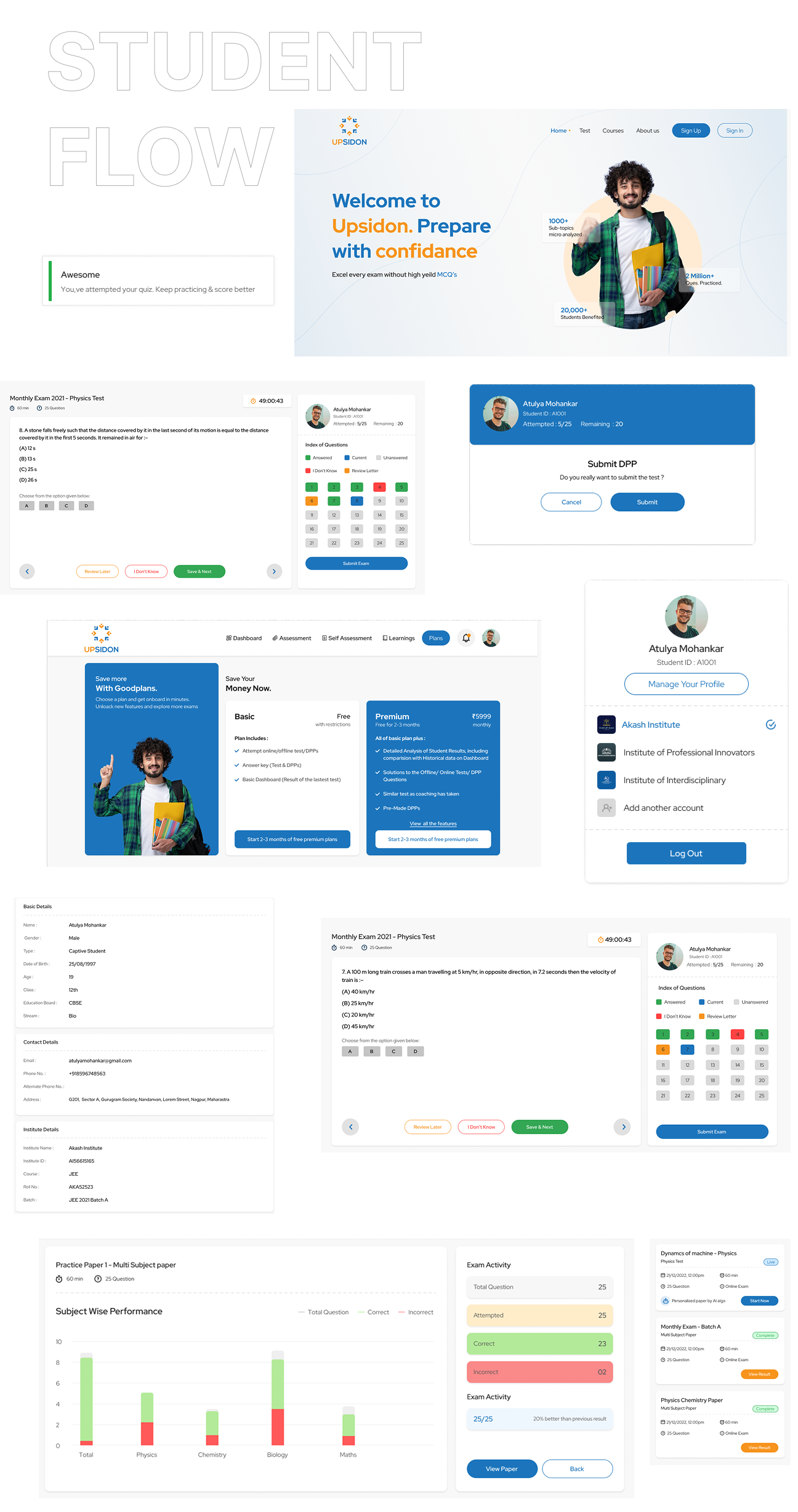
90% of initial flows remained unchanged, evidencing strong stakeholder alignment and a user-centric approach.
The project was completed within 3 months with only minor revisions
Delivered comprehensive Figma files, research documentation, and hosted an in-depth project walkthrough for the development team to ensure a seamless design-to-development transition.